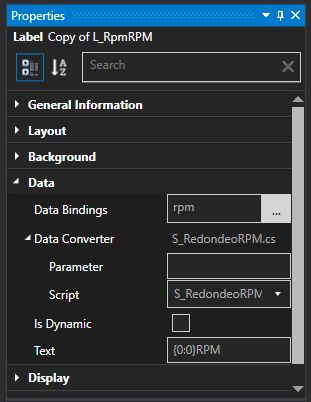
Hi everyone, I have an issue with RPM value in theme editor, when I search the data binding it says that the values are in 50 rpm steps but the values that I get are not in 50 rpm steps. I'm trying to put a dynamic background with the value of RPM but my png files are made in values of 50 (0,50,100,150...etc) and do not work. Can anyone tell me how to round the RPM value in steps of 50, please?
P:D: Sorry for my bad english
NT
Nick Thissen
Appgineering
Reply #1
Use a converter script to round the value. You can round using something like:
It says that is not a valid code :S I still trying
SG
Simon Grossmann
Appgineering
Reply #4
Can you post your full script file?
JA
Jason A.
Reply #5
Toni this is the script i use for images that are done at increments of 100
using System;
using ATVO.ThemesSDK;
using ATVO.ThemeEditor.ThemeModels;
using ATVO.ThemeEditor.Scripting.DotNET;
using ATVO.ThemesSDK.Data.Entity;

namespace Scripts
{
	public class Script
	{
		public object Execute(ThemeContentItem item, object value, string parameter, ISimulation sim)
		{
			value = ((IDriver)value).Car.Movement.Rpm;
			value = (int)value / 100 * 100;
			return value.ToString();
		}
	}
}
TR
Toni R.
Reply #6
Thanks Jason! I will use it
TR
Toni R.
Reply #7
May be I still missing something about how to use the scripts in ATVO, but this is what I get...
I use the code that Nick had given me, It's necessary to do somthing more?
NT
Nick Thissen
Appgineering
Reply #9
Please post your full script file, including everything around the code i posted. It will not work (or even compile) with just my few lines. Jason's code is more complete but you need to think about the databinding you are using. You are binding to the rpm value so the "value" parameter will already be the RPM. In Jason's code, he is being to the "driver" object and has to extract the RPM from the driver.
TR
Toni R.
Reply #10
This is my code, just copy/paste from the up code:
using System;
using ATVO.ThemesSDK;
using ATVO.ThemeEditor.ThemeModels;
using ATVO.ThemeEditor.Scripting.DotNET;
using ATVO.ThemesSDK.Data.Entity;

namespace Scripts
{
 public class Script
 {
 public object Execute(ThemeContentItem item, object value, string parameter, ISimulation sim)
 {
 value = ((IDriver)value).Car.Movement.Rpm;
 value = (int)value / 50 * 50;
 return value.ToString();
 }
 }
}
I'm thinking.... Must I to change this line "value = ((IDriver)value).Car.Movement.Rpm;" to "value = ((RPM)value).Car.Movement.Rpm;" for the code to work???
You want to use this script to convert a data-binding. In that case, you need to keep "Auto-update" disabled. Auto-update is for scripts that are not linked to a data-binding but simply run every data update.
You are using this script for a data-binding set to "rpm" binding. This means the "value" parameter in the script is your rpm value already (not rounded). In your script, you are using the value as if it is an IDriver object. The script you copied probably was using the "driver_object" data-binding, which is indeed of type IDriver. So either change the databinding to "driver_object", or change the script. Probably you can just remove the first line (in the Execute function).
When running your current script you should have been receiving errors. Check the error log, perhaps it tells you what is wrong.